Viewing segment or service information direct from PNR
We've all had it, you're past the booking stage and the customer asks you 'how long is that flight again?' or asks you which aircraft is serving the route, well you can find out using a couple of keys.
When in a PNR - just press Shift+F9 / 4 / 2 and then enter the segment numbers to view, or press enter to view them all and you'll see something similar to below:
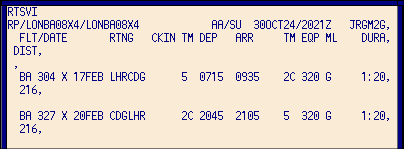
From here you can see the flight number, class, date, route, arrival and departure terminals, times, aircraft, meal service option and duration.
If you're REALLY that bothered you can also see how many CO2 emissions a journey makes by selecting Shift+F9 / 4 / 1 and then enter the segment numbers to view, or press enter to view them all to get this:
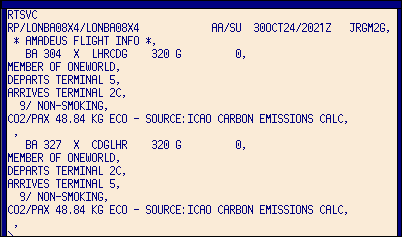
You can see here that flight BA304 from LHR-CDG emits 48.84kg of CO2 per pax on the booking, so that's 146.52kg of CO2 per flight or 293.04kg per pax return.
